Monitor light bar for computer screen: best picks Amazon

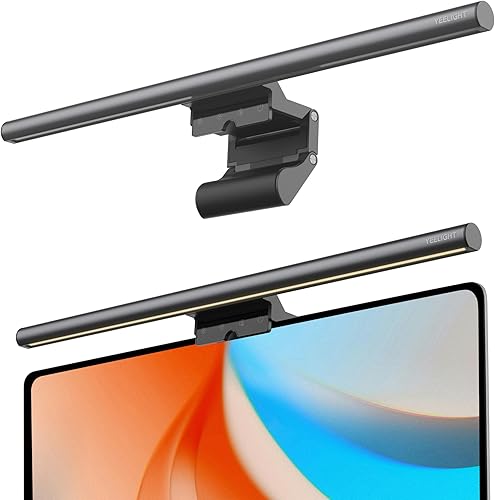
Monitor light bars mount on the top of a display and illuminate the desk below without reflecting off the screen, reducing eye strain from working at night or in dim environments.

By Pickspry EditorialUpdated 4 picks


The short answer

The BenQ ScreenBar Plus at $149 is the best monitor light bar for most home offices: the asymmetric optical design directs all light forward onto the desk surface without hitting the screen, the external dial controller adjusts brightness and color temperature without reaching to the bar and the auto-dimming sensor adjusts to ambient room conditions.

Product buttons open Amazon search results. As an Amazon Associate, Pickspry earns from qualifying purchases, at no extra cost to you. Learn more

Quick picks

How we chose

Monitor light bars are evaluated by optical design (asymmetric vs symmetric, determines whether light hits the monitor screen creating glare), brightness in lux at a standardized distance, color temperature range (warm 2700K to cool 6500K), color rendering index (CRI indicates color accuracy under the light), auto-dimming presence, touch control vs physical dial vs remote, mounting stability (clip weight on monitor bezel) and power source (USB from monitor vs outlet). Specs from manufacturer product pages. We did not test these products.

The picks, in detail

4 picks reviewed
01
Best monitor light bar overall
BenQ BenQ ScreenBar Plus LED Monitor Light with Dial Controller

BenQ ScreenBar Plus LED Monitor Light with Dial Controller

Brand: BenQ

Best for

Home office users who want the best combination of screen-glare-free illumination and physical dial control, where the ScreenBar Plus's external controller provides brightness and color temperature adjustment without reaching to the bar.

Skip if

Back-of-monitor ambient glow is desired. The BenQ ScreenBar Halo at $199 adds a rear-facing backlight that creates an ambient glow behind the monitor, reducing perceived contrast between the bright screen and dark background. If ambient backlighting is a priority, the Halo is the appropriate choice.

The BenQ ScreenBar Plus uses an asymmetric optical lens design that concentrates all emitted light into a forward-facing asymmetric pattern, illuminating the desk and keyboard without any light directed at the monitor face. This eliminates screen glare from a desk lamp, which is the most common cause of screen reflection during night work.

The external dial controller sits on the desk surface and adjusts brightness and color temperature by rotation, providing tactile adjustment without reaching to the mounted bar. An auto-dimming sensor reads ambient room brightness and adjusts the bar output to maintain consistent desk illumination as room lighting changes.

CRI of 95+ indicates that object colors under the ScreenBar Plus appear accurate rather than color-shifted, relevant for designers, editors and anyone doing color-sensitive work.

At $149, the ScreenBar Plus is the standard recommendation in the monitor light bar category.

What buyers say

Home office users who want the best combination of screen-glare-free illumination say BenQ ScreenBar Plus LED Monitor Light with Dial Controller does what it describes without needing adjustments out of the box. Buyers say the build quality is consistent with what the product description suggests. Buyers who find themselves in a position where back-of-monitor ambient glow is desired say a different option makes more sense for their situation.

Specifications

Specifications for BenQ ScreenBar Plus LED Monitor Light with Dial Controller
Brightness500+ lux at 45 cm
Color temperature2700K-6500K
CRI95+
Price$149

Specs from BenQ, ScreenBar Plus product page
02
Best back-lit monitor light bar
BenQ BenQ ScreenBar Halo LED Monitor Light

BenQ ScreenBar Halo LED Monitor Light

Brand: BenQ

Best for

Users who want the ScreenBar Plus features plus a rear-facing ambient backlight that creates a wall glow behind the monitor, reducing the contrast between a bright display and a dark room background for comfortable late-night work.

Skip if

Desk illumination only is the goal. The BenQ ScreenBar Halo at $199 is $50 more than the ScreenBar Plus. The rear backlight is an aesthetic and comfort feature for dark-room users. For standard desk illumination without ambient back glow, the ScreenBar Plus at $149 provides the same desk performance.

The BenQ ScreenBar Halo combines the asymmetric front-facing light of the ScreenBar Plus with a rear LED strip that casts an indirect ambient glow onto the wall behind the monitor. The rear glow reduces the perceived brightness contrast between the monitor and the surrounding dark wall, a technique called bias lighting that reduces eye strain in dark rooms.

The external dial controller operates both front and rear lights independently, allowing separate brightness settings for each. The front light CRI and color temperature range match the ScreenBar Plus.

At $199, the ScreenBar Halo is the complete desk and ambient lighting solution for dark-room monitor users.

What buyers say

Most buyers fitting the profile of users who want the ScreenBar Plus features plus a rear-facing ambient backlight that creates a wall glow behind the monitor report BenQ ScreenBar Halo LED Monitor Light meets their expectations across regular use. Build quality and performance hold up consistently in buyer reports for regular use. The common reason buyers pass on it is when desk illumination only is the goal.

Specifications

Specifications for BenQ ScreenBar Halo LED Monitor Light
Front lightAsymmetric desk illumination
Back lightAmbient rear-facing glow
ControllerExternal dial
Price$199

Specs from BenQ, ScreenBar Halo product page

03
Best budget monitor light bar
Quntis Quntis Computer Monitor Light Bar

Quntis Computer Monitor Light Bar

Brand: Quntis

Best for

Budget-focused buyers who want screen-glare-free desk illumination at the lowest price, with touch controls on the bar itself and USB-A power from any monitor or hub.

Skip if

External physical dial control is needed. The Quntis uses touch controls on the bar itself rather than an external dial, requiring reaching up to the mounted bar to adjust brightness. For users who adjust brightness frequently during the workday, the BenQ ScreenBar Plus's external dial is significantly more convenient.

The Quntis monitor light bar provides asymmetric optical design and USB-A power at $110 less than the BenQ ScreenBar Plus. Three color temperature presets (warm, neutral, cool) cover the main working scenarios without the continuous color temperature adjustment of the premium models.

USB-A power from the monitor's USB hub eliminates a separate power adapter. Touch controls on the bar adjust brightness and color temperature by tapping.

At $39, the Quntis is the accessible entry to screen-glare-free monitor bar lighting.

What buyers say

Buyers say Quntis Computer Monitor Light Bar delivers on its stated purpose without hidden trade-offs in the first several uses. The group most consistently satisfied is budget-focused buyers who want screen-glare-free desk illumination at the lowest price, who say it handles their specific use case reliably. Where buyers recommend looking elsewhere is when external physical dial control is needed.

Specifications

Specifications for Quntis Computer Monitor Light Bar
PowerUSB-A
Color temperature3 presets
Touch controlOn-bar touch
Price$39

Specs from Quntis Monitor Light Bar, Amazon search

04
Best entry-level monitor light bar
Baseus Baseus Monitor Light Bar i-Wok Screen Hanging Light

Baseus Monitor Light Bar i-Wok Screen Hanging Light

Brand: Baseus

Best for

First-time monitor light bar buyers who want the lowest price to evaluate whether a monitor bar improves their workspace before considering the Quntis or BenQ models.

Skip if

CRI and color accuracy are priorities. Entry-level monitor bars at $29 provide adequate asymmetric illumination for general desk use but typically do not specify CRI. For designers, photo editors and users doing color-sensitive work, the BenQ ScreenBar Plus's CRI 95+ specification provides measurably better color rendering.

The Baseus i-Wok screen hanging light provides asymmetric desk illumination with an on-bar rotary dial for brightness adjustment at the lowest price in this guide. USB-A or USB-C power options accommodate any monitor hub configuration.

The universal top-clip mounting attaches to monitor bezels from 1 to 30mm thick, covering most desktop monitors. For users unsure whether a monitor light bar will improve their workspace, the Baseus provides the trial experience at minimal cost.

At $29, the Baseus i-Wok is the lowest-cost entry to monitor bar desk lighting.

What buyers say

Buyers point out that when cRI and color accuracy are priorities, a different product is the stronger fit. Outside that situation, Baseus Monitor Light Bar i-Wok Screen Hanging Light gets straightforward positive feedback from people using it as intended. For first-time monitor light bar buyers who want the lowest price to evaluate, the performance buyers report is consistently positive across the product's intended use.

Specifications

Specifications for Baseus Monitor Light Bar i-Wok Screen Hanging Light
PowerUSB-A or USB-C
ControlRotary dial (on-bar)
MountingTop-clip universal
Price$29

Specs from Baseus i-Wok, Amazon search

Color temperature guide

Color temperature Description Best for
2700K Warm white Evening work, relaxed sessions
3500K Soft white General work in dim rooms
4000K Neutral white General office work
5000K Daylight Morning/afternoon work, color tasks
6500K Cool daylight High-focus work, close to natural light

Monitor bar vs desk lamp comparison

Factor Monitor light bar Desk lamp
Screen glare None (asymmetric optics) Often causes glare
Desk space None (mounts on monitor) Requires base footprint
Color temp range 2700-6500K Fixed or limited
CRI (premium) 95+ Varies by bulb
Price range $29-199 $20-150

Compare the picks

Side by side comparison of every pick
Specification
BenQ BenQ ScreenBar Plus LED Monitor Light with Dial Controller
BenQ ScreenBar Plus LED Monitor Light with Dial Controller
BenQ BenQ ScreenBar Halo LED Monitor Light
BenQ ScreenBar Halo LED Monitor Light
Quntis Quntis Computer Monitor Light Bar
Quntis Computer Monitor Light Bar
Baseus Baseus Monitor Light Bar i-Wok Screen Hanging Light
Baseus Monitor Light Bar i-Wok Screen Hanging Light
Our verdictBest monitor light bar overallBest back-lit monitor light barBest budget monitor light barBest entry-level monitor light bar
Brightness500+ lux at 45 cmNot listedNot listedNot listed
Color temperature2700K-6500KNot listed3 presetsNot listed
CRI95+Not listedNot listedNot listed
Price$149$199$39$29
Front lightNot listedAsymmetric desk illuminationNot listedNot listed
Back lightNot listedAmbient rear-facing glowNot listedNot listed
ControllerNot listedExternal dialNot listedNot listed
PowerNot listedNot listedUSB-AUSB-A or USB-C
Touch controlNot listedNot listedOn-bar touchNot listed
ControlNot listedNot listedNot listedRotary dial (on-bar)
MountingNot listedNot listedNot listedTop-clip universal
BuyCheck priceCheck priceCheck priceCheck price

Questions people ask

What is the difference between a monitor light bar and a desk lamp?

A standard desk lamp positioned in front of or to the side of a monitor reflects light off the screen into the user's eyes, creating glare that increases eye strain. A monitor light bar uses an asymmetric optical lens design to direct light exclusively downward onto the desk surface in a forward-facing pattern, illuminating the keyboard and work surface without directing any light at the monitor face. The result is bright desk illumination with no screen reflection. A desk lamp achieves the same result only when positioned behind the monitor at a specific angle, which most desk configurations make impractical.

What color temperature is best for working at night?

2700-3500K (warm white) reduces blue light emission compared to daylight temperatures (5000-6500K), which is beneficial for reducing circadian rhythm disruption during evening work. Many monitor light bars offer a warm preset specifically for night use. For work that requires accurate color perception (design, photography), neutral to cool temperatures (4000-5000K) are preferable during daytime hours. The BenQ ScreenBar Plus's continuous color temperature adjustment allows using warm at night and neutral during the day without switching products.

What CRI should a monitor light bar have?

CRI (Color Rendering Index) measures how accurately an artificial light source renders the colors of objects compared to natural daylight. CRI 80+ is acceptable for general desk illumination. CRI 90+ is recommended for work requiring color accuracy (photography, design, illustration, painting). The BenQ ScreenBar Plus at CRI 95+ is among the highest in the consumer monitor bar category. Budget models under $50 often do not specify CRI; for general desk work, this is acceptable; for color-sensitive work, verify CRI before purchasing.